How to connect Claude to Salesforce and turn one sales call into every CRM record
One call recording becomes the Contact, Account, Opportunity, Quote, proposal, and logged Activity in a single Claude Cowork session. The rep improves instead of enters.
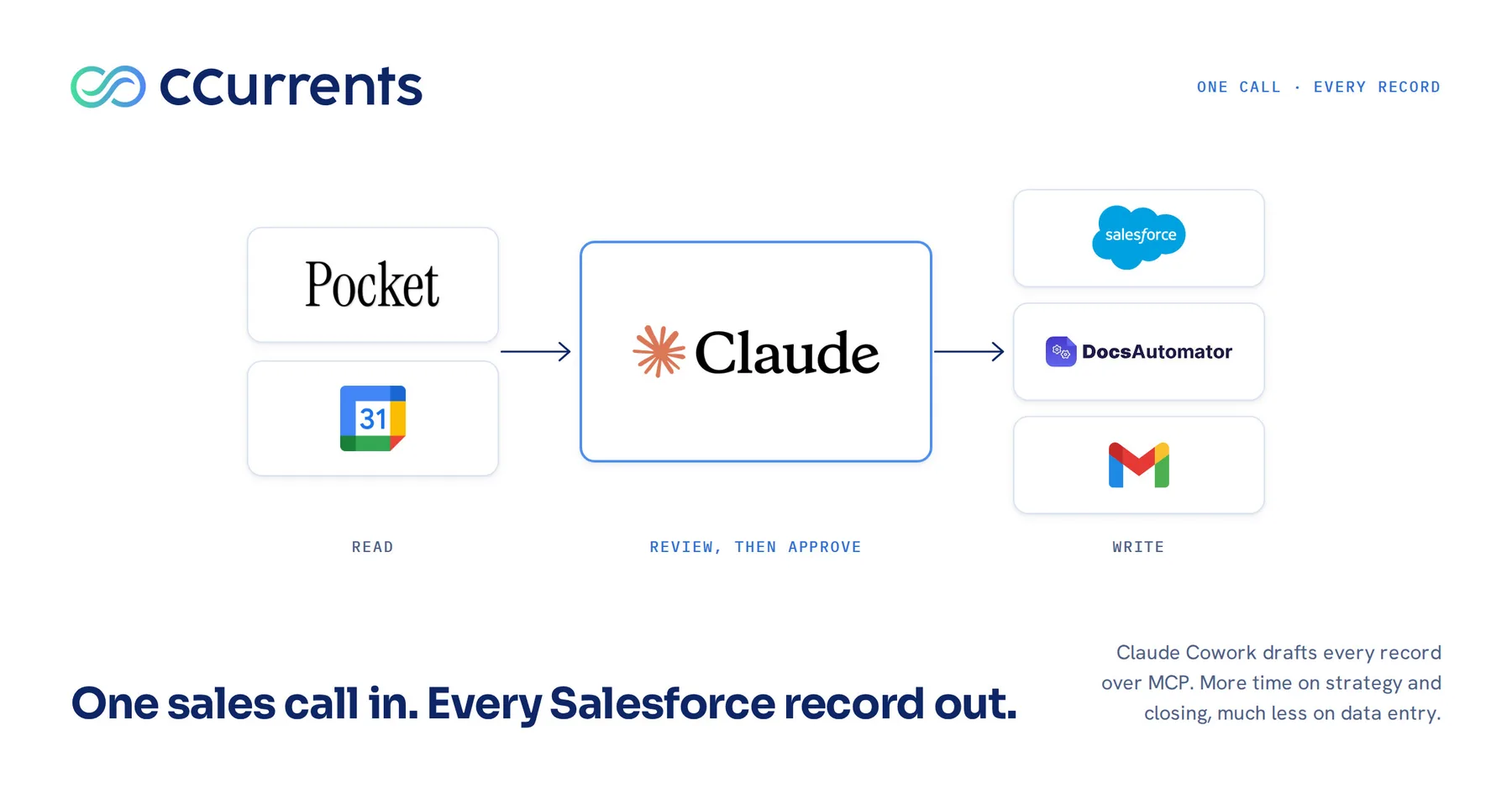
Where do you want your reps spending their time?
A rep’s time has two possible uses. The conversation: the relationship, the discovery, the strategy behind a proposal that fits what the client actually said. Or the record of the conversation: the Contact, the Account, the Opportunity, the Quote, the Activity. Both have to happen. Only one of them generates revenue. Time spent in conversation and on strategy translates into more deals closed, and into larger ones: the rep with an afternoon to think through an account finds the phased option, the second stakeholder, the expansion the client did not know to ask for. Time spent on the keyboard does the opposite. Every hour of data entry is capacity taken away from closing, and it is the part of the job nobody took the job for. Making the administrative half easy is one of the most direct ways to raise a sales team’s revenue and its job satisfaction at the same time, and it costs nothing in rigor.
The second argument is the one the CRO and the CEO care about. When capture has no friction, the data is there: all of it, correct and complete, on the day of the call. Companies that make logging easy take in more information, and better information, than companies that police a logging policy. The rep gains the hour. The manager gains a pipeline that reflects this morning. Marketing gains contacts it can reach. The delivery team gains the transcript. The client gains a proposal the rep had time to think about.
The cost of the status quo has a name: The Reporting Nightmare. A pipeline built from what reps remembered to enter is a forecast no one trusts, and every planning conversation starts with an argument about the numbers. Beneath it sits Missed Follow-ups: the follow-up nobody scheduled is the deal that went quiet.
Fixing this is now a setup task rather than a project. Salesforce and Anthropic announced Claudeforce in August (Salesforce). The Salesforce in Claude plugin opened its beta in September with 37 prebuilt sales skills (AgentExchange), and Salesforce’s own Trailhead unit lists call follow-up from transcripts as a headline use case (Trailhead). Dreamforce framed all of it under AIforce: humans and AI working side by side on one governed foundation (our Dreamforce recap). The announcements describe what a seller can do. What follows is the recipe: one real session, told generically, from a call recording to the contact, the account, the opportunity, the quote, the proposal, and the logged activity, with every write approved by the rep. The prebuilt skills carry the briefing, the pipeline review, the meeting prep, and the follow-up. This is the rest of the record, and the governance that makes the writes safe. The setup list is at the end, with a workflow prompt you can paste.
Complete, correct, and captured without friction
Everything Salesforce needs about a sales conversation already exists somewhere. The conversation was recorded. The attendees are on the calendar invite with names, titles, and email addresses. The company’s situation was described out loud on the call. The products, prices, and discount rules are in the price book. The rep’s job is not to create this information. It is to move it, and moving structured information between systems is what an agent with tool access does well. The rep’s role shifts from entering to reviewing and improving: humans orchestrate, agents accelerate, humans assure.
It helps to say plainly what “the record” means, because most logging policies stop at the activity. A complete capture of one sales call writes six things to Salesforce.
- The interaction. The call, its attendees, and a summary of what was discussed, decided, and asked for.
- The people. A Lead or Contact for every attendee, created or updated, with name, email, title, and company. If the call produced a real opportunity and the person is still a Lead, the Lead is converted.
- The company. An Account, created or updated with what the call revealed: size, current stack, the problem they are solving.
- The deal. An Opportunity with stage, close date, and amount, and a Quote that carries the right products, prices, discounts, and terms, synced to it.
- The deliverable. A proposal generated from the Quote, so the document the client reads carries the numbers Salesforce holds.
- The follow-up. A task, dated, on the Opportunity, owned by the rep.
The plumbing is the Model Context Protocol (MCP), the open standard that lets an assistant like Claude read from and write to systems such as Salesforce, Gmail, and Google Calendar through connectors, with the permissions of the signed-in user. Salesforce’s Headless 360 MCP Server exposes the platform as governed capabilities rather than raw endpoints; every action runs as the authenticated user and respects field-level security, sharing rules, and permission sets (Salesforce Developers).
From one recording, two moves
The loop starts with the rep pointing Claude Cowork at a recording, by date and account. From there, two moves.
Move one: extract. The assistant pulls the transcript, reads the calendar invite, checks Salesforce for what already exists, and extracts the critical details: who was there, what was discussed, what was promised, and which products and terms came up. We use Pocket for this step because it records the audio of the call, produces the transcript, and hands both to Claude over MCP. A plain audio recording loaded into Claude Cowork works as well; the only difference is that Claude Cowork generates the transcript itself, which is the step Pocket has already done.
Move two: draft and present. The assistant drafts every update as one package and presents it before anything is written. Where it is unsure, it asks: which price book, what close date, is this discount approved. The rep answers, corrects, adds detail, and iterates as much or as little as the deal deserves. Then the rep approves, and the assistant commits.
The rep’s engagement is variable by design, and that is the point. A routine check-in gets a quick review and an approval. A deal that matters gets the rep’s real attention on the proposal narrative, the line items, the discount structure, and the recap, because that time is no longer spent on entry. The assistant does the moving; the rep does the improving. The data captured is richer, and the deliverable the client receives is better, because a person with context spent the hour on the parts a person should spend it on.
Claude Cowork is the surface, connected to each of these over MCP. Three inputs, four destinations.
| Input | What it provides | What it feeds |
|---|---|---|
| The call recording and transcript (Pocket) | Everything that was said: the people, the problem, the scope, the products and terms, the decisions, the next step | Every Salesforce record, the proposal narrative, the recap email, and the knowledge base, where the raw transcript is filed as the definitive document |
| The calendar invite (Google Calendar) | The attendees, the date, and the time | The logged Activity, and the attendee list the People records are matched against |
| Existing Salesforce records (Leads, Contacts, Accounts, Opportunities, Quotes, Products, Price Books) | What already exists, so the assistant can decide what to create and what to update, and which products and prices to select | Every create-or-update decision, and the Quote line items |
| Output | Where it lands |
|---|---|
| Contact, Account, Opportunity, Quote, Activity, and follow-up Task | Salesforce |
| The proposal, generated from the Salesforce records through a DocsAutomator template with bindings for Salesforce data | DocsAutomator, attached to the Opportunity |
| The recap email, as a draft | Gmail |
| The raw transcript, and optionally the generated proposal | The knowledge base |
One destination deserves its own paragraph. The transcript does not only become an Activity summary. It goes, in full, into a knowledge base: an on-demand context engine that Claude Cowork and similar tools can query for anything ever captured about a client or a deal, so a concern raised in a Friday discovery call is available to the person writing requirements the following week. In plain terms it is document ingestion and indexing with retrieval-augmented generation (RAG): a searchable store of a company’s own documents, transcripts, and records that answers with its sources. We run one for every client engagement, and we build them for clients, connected to Salesforce and queried from Claude Cowork the same way this post describes.
The worked example
A discovery call with the marketing team at a growth-stage company evaluating a lifecycle-messaging platform. Three people on their side. The rep has the recording and the calendar invite.
What Salesforce held before the call. The company existed as an Account from a webinar sign-up. The person who booked the call existed as a Lead. The other two attendees did not exist anywhere. No Opportunity, no Quote.
Move one: extract
The rep asks Claude Cowork to find this morning’s call with the account and prepare the updates. The assistant pulls the transcript from Pocket, reads the calendar invite for the three attendees, searches Salesforce for each of them, finds the Lead, confirms the other two are new, reads the Account, and reads the price book. From the transcript it extracts the problem the marketing team is trying to solve, their current stack, the scope they asked for, the platform decision they are weighing, the concerns they raised, the products and terms discussed, and the next step they agreed to.
Move two: draft and present
The assistant returns one review package.
- People. Convert the existing Lead to a Contact on the Account, since an Opportunity is being created. Create two new Contacts with names, titles, and email addresses from the invite, titles confirmed against the transcript. Flag which one appears to be the decision maker, as a question rather than an assertion.
- Account. Update with what the call revealed: approximate size, current marketing stack, the evaluation in progress.
- Opportunity. Create with a proposed stage, a close date drawn from the timeline they stated, and an amount driven by the Quote.
- Quote. Line items matched against the price book, quantities from the scope discussed, list prices, and the discount the rep mentioned on the call, flagged for approval. Where the transcript was ambiguous about scope, the item is included with a question attached rather than silently dropped.
- Proposal. A draft narrative for the proposal document: the client’s stated problem in their words, the recommended scope, which parts are vendor and technology agnostic and have to be built regardless of the platform they choose, and what to weigh in the platform decision (breadth of capability, what their team can do alone versus with support, the vendor’s own support model, and the fact that a learning curve exists either way). The line items and prices come from the Quote.
- Recap email. A draft to the three attendees summarizing the meeting and emphasizing the same points, ready for the rep’s edit.
- Follow-up. A task one week out, on the Opportunity.
- Activity. The logged call, related to the Opportunity and all three Contacts, with the summary, tying everything above to one interaction.
- Knowledge base. The full transcript, filed under the client.
- Open questions. Close date confirmed? Discount approved? Which of the two scope options did they lean toward? Decision maker confirmed?
Where the rep spends the time
Here. The rep answers the questions in a minute. Then the rep does the work that matters: reshapes the proposal narrative around the objection the CMO raised on the call, adjusts one line item because the transcript overstated the seat count, adds a phased option the client hinted they would want, and tightens the recap email so the emphasis lands. Two rounds, maybe three. None of that time is data entry. All of it makes the proposal better and the record richer than a hand-keyed version would have been, because the rep spent the hour improving instead of transcribing.
Commit
On approval the assistant converts the Lead, creates the Contacts, updates the Account, creates the Opportunity and the synced Quote, generates the proposal through DocsAutomator from the Quote and the approved narrative, logs the activity, creates the follow-up task, ingests the transcript into the knowledge base, and leaves the recap in Gmail as a draft. The rep reads the proposal once more, attaches it, and sends the email. Nothing left the company without a person reading it.
What the business got
Everything above landed on the connected customer profile the day it happened: the Opportunity the CEO will see in the forecast, the Quote the amount is built from, the Contacts marketing can reach, the Account detail the next rep will need, the activity the manager can read, the follow-up that will fire, and the transcript anyone can query. What the profile knows becomes what the business does. The customer.io journey or the rep alert that keys off this record now has the record to key off.
On trust: every write happened under the rep’s own Salesforce permissions. Nothing was committed before the rep saw it. Every record shows who created it and when. No email was sent by the assistant. That is more review than a hand-keyed CRM ever got, not less.
How to set this up in Claude Cowork
Connections first, data hygiene second, the saved workflow third, governance last. Each item links to the primary documentation.
- Salesforce. On the org side, turn on Enable MCP Service and create an External Client App for Claude, following Salesforce’s Hosted MCP Servers guide (overview, set up your org, create an External Client App, configure Claude). On the client side, install the Salesforce in Claude plugin and connect the Headless 360 for Sales server, following Anthropic’s Connect to Salesforce page, which also gives the sandbox endpoint. Sign in as the rep, never as an admin or integration user, and start in a sandbox. Salesforce’s developer walkthrough is the narrative version; Revenue Engineer’s 17-minute guide is the best community one.
- The call recorder. A recorder that exposes transcripts over MCP. We use Pocket; its MCP server lets the assistant search recordings, pull full transcripts, and read action items, with OAuth sign-in. Whichever recorder you use, the requirement is that the assistant can find a recording by date and account and read the whole transcript.
- Google Calendar and Gmail. Add both through Claude’s Google Workspace connectors. Calendar supplies attendees, titles, and email addresses when records are missing; Gmail receives the recap as a draft. Grant draft access and keep send with the human.
- DocsAutomator. Connect the proposal template through DocsAutomator’s MCP server so the assistant generates the proposal from the Quote’s line items and the approved narrative, into a fixed template. The document and the CRM then carry the same numbers by construction, and the output is deterministic: same data, same document, every time.
- The knowledge base. A team or client knowledge base the assistant can write to and search, added as a custom connector over MCP or through an API. Ingest transcripts, proposals, and notes there and it becomes the context engine for every later question about the client.
- Clean the price book. The assistant matches quote lines against products, prices, and discount rules that exist. Retire duplicates and stale SKUs first; the catalog is the ceiling on quote accuracy.
- Set the matching and conversion rules. Decide how the assistant identifies an existing Lead, Contact, or Account (email first, then name plus company), when a Lead converts (an Opportunity is created), and which fields a call is allowed to update on an Account. Write these into the saved workflow so every rep gets the same behavior.
- Write the workflow once and save it. One saved prompt or Cowork skill that runs both moves: extract, then draft and present. The prompt text should require the review package before any write. Every rep runs the same loop with the same wording, and improvements to the prompt reach everyone. The Salesforce in Claude plugin’s own skills (activity logging, call follow-up, CRM updates) can be called from inside this workflow rather than replaced by it. The prompt we use is below.
- Present before commit, draft never send. The assistant never writes to Salesforce without the rep’s approval and never sends client email. The rep’s credentials, not a shared login. Activities carry creator and timestamp, so the audit trail is the CRM’s own. For admins registering external servers, Salesforce’s MCP security and risk scores, announced at Dreamforce, are the platform-side complement.
Where the pattern goes next
The same loop applies anywhere a person is asked to re-key what already exists: service teams logging case notes from a support call, customer success writing QBR summaries from a recording, partner managers updating deal registrations from an email thread. Find where the information already lives, connect it, present the draft, and let the human improve instead of type. And the knowledge base that makes step three work is not only for delivery teams. A company that indexes its own calls, proposals, and records this way has a context engine every rep, every agent, and every customer.io journey can draw on. That is the part we build.
The workflow prompt
Paste this into Claude Cowork as a saved prompt or skill and edit the bracketed values.
You are helping me log a sales call completely in Salesforce. Work in two moves and do not write anything until I approve.

Move one: extract.
1. Find the recording of my call with [account] on [date] in Pocket and read the full transcript.
2. Read the calendar invite in Google Calendar for the attendees: names, titles, email addresses.
3. In Salesforce, check what already exists: Leads or Contacts for each attendee (match on email first, then name plus company), the Account, any open Opportunity, and the active price book.
4. From the transcript, extract: the problem they are solving, their current stack, the scope discussed, the products and terms discussed, concerns raised, decisions made, and the next step agreed.

Move two: draft and present.
5. Draft, and show me before writing:
   - People: for each attendee, create, update, or convert (convert a Lead only if we are creating an Opportunity). Flag who appears to be the decision maker as a question.
   - Account: fields to update from what the call revealed.
   - Opportunity: stage, close date from the stated timeline, amount driven by the Quote.
   - Quote: line items matched to the price book, quantities from the scope discussed, list prices, any discount mentioned flagged for approval. Where scope is ambiguous, include the item with a question rather than dropping it.
   - Proposal: a draft narrative for DocsAutomator, in the client's words, with the line items from the Quote.
   - Recap email: a draft to the attendees for Gmail, emphasizing [points I care about].
   - Follow-up task: one week out, on the Opportunity, owned by me.
   - Activity: the logged call, related to the Opportunity and every attendee, with the summary.
   - Knowledge base: the full transcript, filed under this client.
6. List every open question. Wait for my answers and edits. Revise until I approve.

On approval: commit the Salesforce records, generate the proposal, create the task, ingest the transcript, and leave the recap in Gmail as a draft. Never send email. Never write to Salesforce without my approval.
The short version
A rep’s hour is worth more in conversation than in data entry, and the record should not be the price of the conversation. Everything Salesforce needs already exists in the recording, the calendar, the price book, and the proposal template. Connect them to an assistant that drafts every record and presents it for review, and the rep spends the time improving the proposal instead of entering the quote. The forecast gets the call that happened this morning, complete and correct, and the client gets a better proposal.
In a 30-minute working session we connect the pieces to a sandbox and run the loop against one of your real call recordings.
AnswersThe Reporting NightmareMissed Follow-ups