Salesforce Experience Cloud implementation: how the native route compares
What a Salesforce Experience Cloud and Mobile Publisher build involves, where it fits, and how it compares with four other ways to connect external users.
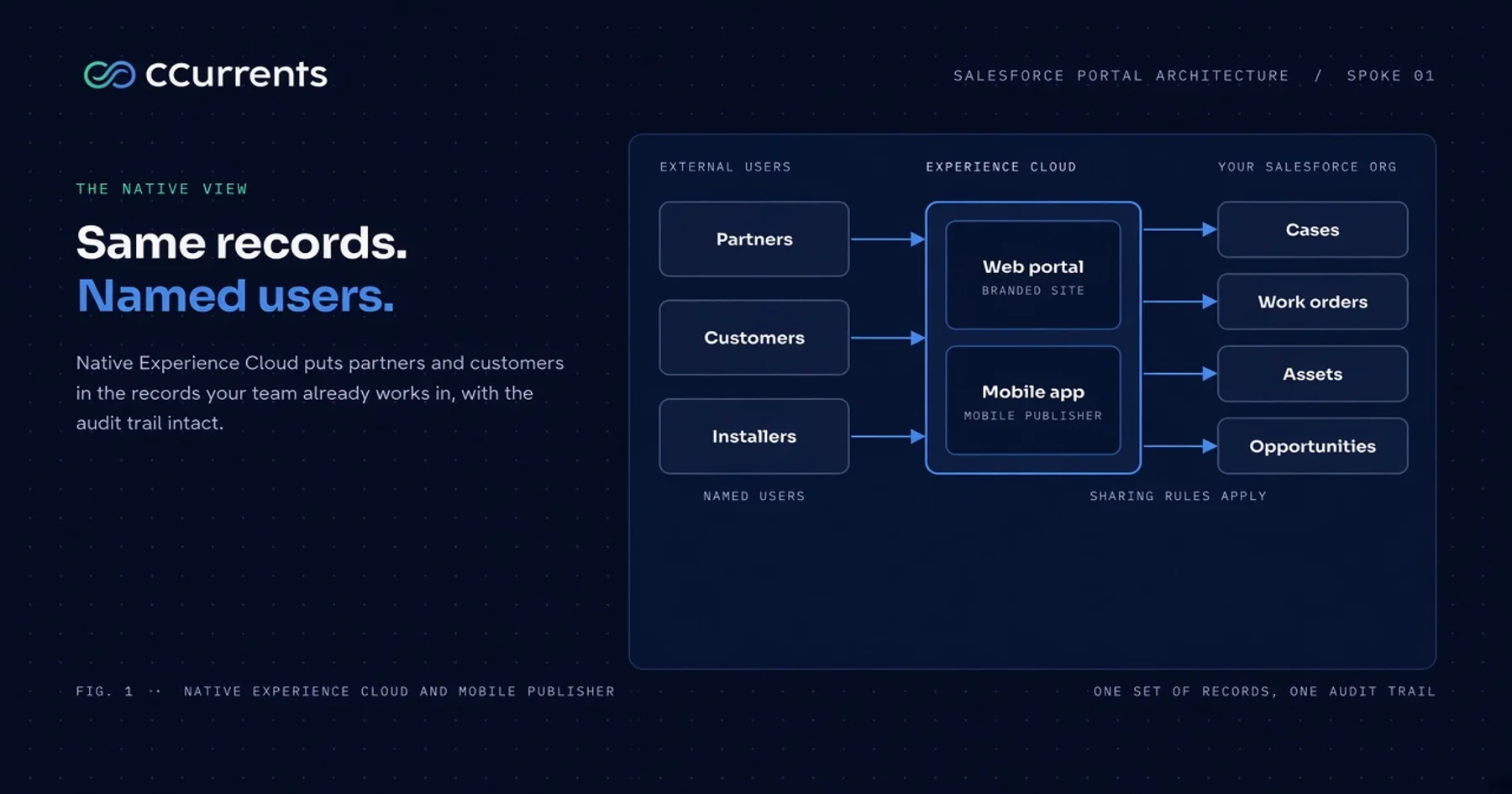
Your partners, installers, or customers need to work with data that already lives in Salesforce. Salesforce Experience Cloud is the native way to give them that access, and it is the option most leadership teams reach for first. Whether it is the right one depends less on the product than on what you are asking of it: who the external users are, what they touch, what else the experience must reach, and who runs it after launch.
This is the first guide in the series that follows our Salesforce portal architecture: five ways to connect external users. It examines Experience Cloud the way an implementation partner has to: what gets built, what can go wrong, who owns what, and how it compares with the other four patterns. Licensing is Salesforce’s to quote, so this guide leaves price out and concentrates on delivery.
What you are building
Experience Cloud is Salesforce’s product for giving external users a branded site on the same database your sales, service, and operations teams already use. A partner, customer, or installer signs in and sees only the records they are entitled to: their cases, their work orders, their deals, their equipment. When your team updates a record, they see it. When they update one, your team sees it. Platform automation that fires on those changes (emails, notifications, updates, callouts, and the rest) stays available to both sides.
Every external user is a named Salesforce identity, not a shared login. That one design choice explains most of what follows: the strength of the security model, the audit trail, and a good share of the work in an Experience Cloud implementation.
Mobile Publisher is an add-on that packages the same Experience Cloud site as a branded iOS and Android app. Salesforce handles the app store submission and review. You create the Apple and Google developer accounts and provide the listing details and brand assets, but you do not run the submission or the security review yourself.
Where Experience Cloud earns its place
Experience Cloud delivers the most value in three areas:
No second copy of your data. Experience Cloud reads and writes the live Salesforce record. There is no synchronization pipeline to build, monitor, or reconcile, and no window in which a partner sees yesterday’s answer. For field service, where a technician in a customer’s home needs the current equipment history and the open work order, that can be the difference between a finished visit and a return trip. It is the direct solution to Customer Data in Silos.
An audit trail with a name on it. Every change is recorded against the person who made it, under the same permission and sharing rules as your own staff. When HIPAA or SOC 2 reviewers ask who changed what, that is evidence you do not have to build. Architectures that run every external user through one shared service account record the system, not the person.
A governed starting point. Identity, permissions, sharing, and hosting come with the platform. You configure rather than construct, and Salesforce carries platform security patching and release upkeep.
The pattern suits any company that puts outside technicians into customers’ homes, whether for home dialysis equipment like Outset Medical’s or connected fitness hardware like Tonal’s. The same applies to fulfillment partners working shared work orders and equipment records alongside your internal team.
We build Experience Cloud for clients today, including a donor experience for Proesis Biologics, where donors manage eligibility, enrollment, and rewards in one place, and the school partner site at BLOCS. Solving The Onboarding Barrier, and giving customers and partners real-time access to the records they share with you, is what Experience Cloud is for.
How an Experience Cloud implementation runs
A native Experience Cloud build runs in six workstreams. None is exotic, but each carries a decision a sponsor should make with purpose.
1. Access model
Everything else depends on this one. We map each type of external user (installer, distributor, school administrator, donor) to the records they need and the actions they may take, then translate that into Salesforce’s sharing model. The access model also determines which license type each user group needs, so your Salesforce account team can quote against a settled design rather than a guess. Settle it first. Changing it after the build means rework.
2. Identity and onboarding
This covers how people get in: invitations or self-registration, approval steps, single sign-on with your existing identity provider, multi-factor authentication, and how access is removed when a partner leaves. It is where The Onboarding Barrier shows up. An Experience Cloud site that is hard to join does not get used, and partners fall back to email.
3. Experience and custom components
Configuration alone gets you a working Experience Cloud site for standard needs: submit a case, search knowledge, view a list of records. Out-of-the-box capability hits a wall quickly. In many scenarios, focused Lightning Web Components (LWCs) solve the gap.
- Work that spans several records. Completing a visit might close a work order, update the equipment record, and log a reading. Standard screens handle one record at a time, so custom components keep those steps together and prevent half-finished records.
- Views that combine data. A technician who needs today’s jobs next to live equipment status needs a purpose-built screen.
- Brand. Out of the box, Experience Cloud looks like Salesforce. Customers and partners notice. Consumer-grade experiences need a deliberate brand treatment, and that is achieved best through custom experience design with LWCs.
Custom components solve all three: someone designs, builds, tests, and maintains them. The decision is how far to go. Every departure from standard functionality is something to build and maintain.
4. Data and integration
Experience Cloud is strongest when most of what users need already lives in Salesforce. When partners also need data from an ERP, billing system, or scheduling tool, you have two paths. The common one is to bring that data into Salesforce first (we typically use n8n as the connective layer) so the experience reads live records under the same sharing model. The other is a real-time callout from a custom Lightning Web Component when a live read from the other system is enough and a permanent copy is not. Both paths are something to build, secure, monitor, and support. A few well-scoped connections are normal. A long list of systems that must appear in one screen is the signal to look at a decoupled design, where a custom app may fit better than native Experience Cloud.
5. Mobile
If your users need a mobile app, the Mobile Publisher work is packaging and release rather than a second build: the Apple and Google developer accounts, the store listing, brand assets, push notifications, and a beta build for review. The Experience Cloud site itself still needs mobile optimization. Once you package a build and put it on devices (for example through TestFlight on Apple), you can refine the mobile experience before final publishing.
Salesforce advises planning at least a week from submitting a beta build to a response, and reviews may reject a submission and require rework. The publishing process takes time. Once the app is published, changes you make in Experience Cloud appear in it without a new store submission.
The app is the Experience Cloud site in a native shell, so it needs a network connection. You can reach some device features (photos, files, GPS, and others), but offline behavior has to be evaluated, and you need to plan build and testing around what Mobile Publisher can and cannot do there.
6. Security review, testing, and release
External users are your most exposed surface. The platform limits what each person sees, but only as well as the permissions are designed, and custom components must be written to respect them.
We run an independent permissions review as a gate on every pull request: to verify that each user sees and edits only what they need, we run tests as that user, and we update tests and logic when privileges change. The most dangerous failure is a quiet one, an over-broad sharing rule that shows one customer or partner another party’s records, or any data they should not access.
At launch, start with an early pilot group, run rigorous end-to-end security testing, then open Experience Cloud to the wider network once that work is verified.
Who does what
Some issues that arise on an Experience Cloud project trace back to an unstated assumption about ownership. This is how responsibility is shared among the parties who build and maintain the deployment.
| Area | Salesforce | Your team | CCurrents |
|---|---|---|---|
| Platform and upgrades | Runs and patches the platform; ships three releases a year | Plans for release timing: regression testing and verification | Coordinates testing with you ahead of each release |
| License quote and contract | Quotes and contracts the licenses | Decides user groups and volumes | Verifies licensing compatibility against your roadmap and build |
| Access model | Provides the sharing framework | Owns the decisions on who should see what | Designs, builds, and tests it |
| Experience Cloud build | Provides the platform | Supplies process knowledge, content, and brand | Configures, builds custom components, and integrates other systems |
| App store submission and review | Packages and submits the app and handles the stores’ review | Holds the Apple and Google developer accounts; supplies listing details and brand assets | Configures the app and coordinates the listing inputs |
| Ongoing support | Platform support under your contract | Names a business owner | Runs the backlog, permission reviews, and release regression |
Mobile Publisher or a custom-built app
Mobile Publisher and a custom mobile app take two different paths to the app stores.
| Mobile Publisher | Custom-built app | |
|---|---|---|
| Path to the stores | Salesforce packages and submits the Experience Cloud site | Your team builds, submits, and renews |
| Review and compliance | Handled by Salesforce | Owned by your team |
| Offline work | Needs a live connection | Possible when designed for it |
| Reach beyond Salesforce | Constrained to Salesforce (except for components that may call out and retrieve data from other systems) | Connect to anything you engineer in the app |
| Ongoing engineering | Little beyond Experience Cloud itself | A second codebase to maintain |
Decide on offline needs before you decide on the app. Technicians who work in basements, rural sites, or hospitals with poor signal are the clearest case for a custom build.
Running it after launch
Experience Cloud is a product you operate, not a project you close. Salesforce ships three platform releases a year, and each can touch what your custom components rely on. Permissions need review as partners join, leave, and change roles. Registration and sign-in patterns show where onboarding friction is building. The site needs a named business owner and a standing backlog. Users will report issues and give feedback, and ongoing optimization is often what makes the experience efficient enough that people keep working in it instead of around it.
The business risks, and how to contain them
| Risk | What it looks like | Control |
|---|---|---|
| Over-broad access | One partner sees another partner’s records. | Least-privilege design, an independent permissions review as a release gate, and the named-user audit trail. |
| Customization debt | Custom components accumulate without an owner and break at platform releases. | Name an owner, test at every release, document every component. |
| Integration sprawl | Every added system is another sync or callout to build and monitor, and the numbers drift apart. | Inventory the systems in scoping, prefer a small number of deliberate connections (sync into Salesforce or a scoped real-time callout), and evaluate a decoupled app design when the experience must orchestrate many systems at once. |
| Onboarding friction | Partners find joining hard and revert to email. | Design registration and approval flows early, pilot with one group, and watch activation. |
| Store timing and connectivity | Release dates depend on Apple and Google review, and poor signal strands field staff. | Salesforce manages submission and review, so plan releases around the review window. Settle offline needs before choosing Mobile Publisher. |
| Logic trapped in screens | Business rules live inside Experience Cloud screens, so a later move means a rewrite. | Keep rules in reusable platform services, so a later change of front end is a new front end rather than a rewrite. |
Experience Cloud against the four alternatives
Any build will evolve as users give feedback and as experience and logic needs change. The table below holds the status quo constant so the comparison stays simple.
| Option | Who signs in, and how | Where access is enforced | Build and ongoing support | Reach beyond Salesforce |
|---|---|---|---|---|
| Experience Cloud and Mobile Publisher | Named Salesforce users | The platform’s sharing model | Moderate build: configuration plus custom components. Ongoing: platform releases and component upkeep | Salesforce data; other systems via sync into Salesforce or scoped component callouts |
| Public sites and guest users | No sign-in; one-time verification for status checks | Custom code on every request | Low to moderate build. Ongoing: security upkeep of the guest boundary | Intake into Salesforce; no account history |
| Decoupled web and mobile apps | External identity provider or Salesforce External Identity | Purpose-built endpoints you own | High build: a full application. Ongoing: dedicated engineering, testing, submissions to app stores | Salesforce and adjacent systems directly, as needed for the app |
| Third-party visual builders | Builder-managed verification | Filters configured by hand behind one service account | Low build; administrators change forms. Ongoing: the third-party platform and the integration user | Salesforce, plus the builder’s own connectors |
| Headless Salesforce and MCP | Identity delegated through the chat or agent tool | Least-privilege tools scoped to specific actions | Moderate build: an MCP server and n8n workflows. Ongoing: governing tool scope | Across systems through n8n |
The full five-way matrix lives in the playbook. What changes if you choose another route:
- Public sites and guest users. You collect information from anyone without an account, and you give up collaboration. Users cannot return to see their history, and every request depends on code that must be hardened and reviewed.
- Decoupled apps. You gain design freedom and a single view across Salesforce and your other systems. You take on a full application: front-end engineers, API contracts, and your own release process.
- Third-party visual builders. Your operations team changes forms without an engineering sprint. Salesforce’s sharing rules no longer see the external user, so separation between users is configured by hand and has to be governed.
- Headless Salesforce and MCP. Partners act from Slack, Teams, or an AI assistant instead of another front end. The work shifts to scoping what each tool is allowed to do and watching how it is used.
When Experience Cloud wins, and when to look elsewhere
Native Experience Cloud wins when:
- Your external users are a defined network working alongside your team on shared records: cases, work orders, equipment, deals.
- Regulation or audit requires a named person behind every change.
- Most of what the experience shows already lives in Salesforce, or can be reached from it with a small number of syncs or scoped callouts.
- You want a governed Experience Cloud site, and an app in the stores, without building either from scratch.
Look at the alternatives when:
- The audience is very large, or most users visit a few times a year.
- The experience has to combine data from several systems into one view that goes beyond what sensible syncs or component callouts can carry, or that forces access patterns Experience Cloud components are a poor fit for.
- Field staff need to work offline.
- You mainly need to collect information rather than collaborate on it.
- The experience has to depart far from the platform’s own look and behavior.
How we help
We design, build, and run Experience Cloud as part of the revenue and operating engines we build for clients: Experience Cloud where it fits, another pattern where it does not. A working session produces five things: a map of your external user types, the access model, an inventory of the systems the experience must reach, the mobile scope, and a release and support plan. Slipstream, the CCurrents delivery agent system, and the elastic team (five specialties, one rate, zero hiring risk) carry the work from story to release. Humans orchestrate, agents accelerate, humans assure.
We will test your access model and integrations against Experience Cloud and the four alternatives, and give you our clearest, honest assessment.
Bring your external user types and the systems your Experience Cloud site must reach.
AnswersThe Onboarding BarrierCustomer Data in Silos