Salesforce portal architecture: five ways to connect external users
Five ways to connect external users (customers, partners, and installers) to Salesforce data, compared on security, delivery effort, ownership, and fit.
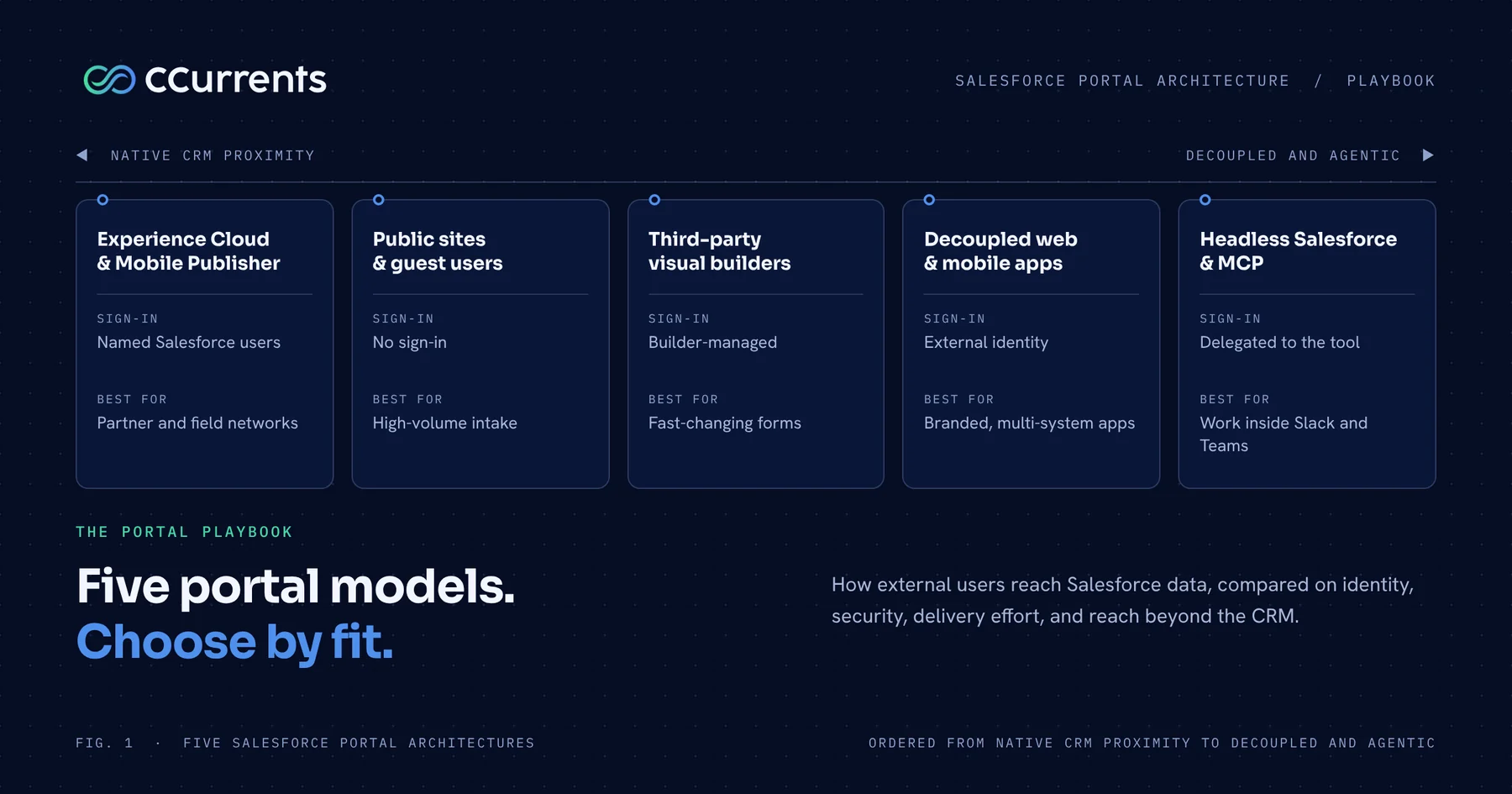
Sooner or later, the people outside your company need to work with what is inside Salesforce. Customers want to see their cases. Partners want to register deals. Installers want the work order and the equipment history. Until they can, your team relays updates over email, transcribes questionnaires from PDFs, and reconciles shared spreadsheets.
Giving those external users direct access is a delivery decision with consequences. How do they prove who they are? What can each one see? What else must the portal reach? Who builds it, and who keeps it running? Salesforce offers more than one way to do it, and each way makes a different trade. This playbook sets out five.
Each section gives the executive view: what the option is, where it fits, and the main risk. A deep-dive guide for each follows as it ships; the Experience Cloud guide is live, and the others are coming. Licensing and pricing are set by Salesforce and the other vendors, who quote them, so this series covers fit and delivery rather than price.
The portal decision: Two ways it goes wrong
Most companies reach this decision under pressure, and two failure modes show up again and again.
- The default choice. Teams assume native Salesforce Experience Cloud is the only compliant way to expose CRM records and apply it to every audience. It is the right answer for a defined network working on shared records. For people who visit a few times a year, or who need a distinctive experience or data from other systems, it is a heavy answer that takes longer to deliver and fits less well.
- The un-governed shadow form. Frustrated by the scope of a full portal, engineering teams hack together fragile web forms or stitch together disconnected third-party tools. These push data into Salesforce through accounts with broad privileges, bypassing field-level security and record validation. What begins as a quick fix ends as a data privacy incident or an unmaintainable web of technical debt.
Neither serves a scaling business. Exposing CRM records safely does not require a full portal for every audience, and a lighter route does not require compromising governance. Between the two sits a spectrum of five architectural patterns. Choosing among them means weighing who your users are, how often they come, what they must touch, what else the portal must reach, and what your team can own after launch.
NATIVE CRM PROXIMITY                                              DECOUPLED & AGENTIC
[Pattern 1]         [Pattern 2]          [Pattern 5]          [Pattern 3]        [Pattern 4]
Experience Cloud    Public Sites         Third-Party          Decoupled Apps     Headless MCP
& Mobile Publisher  & Guest Users        Visual Builders      & Ext Identity     & Agent Surfaces
--------------------------------------------------------------------------------------------
Native Sharing      No Sign-In           Visual Assembly      Brand Control      Chat Surfaces
Named Users         Intake Only          Integration User     Cross-App Access   Scoped Tools
The five-way decision matrix
The matrix compares the patterns on how users sign in, where access is enforced, how much has to be built and supported, and how far the portal reaches beyond Salesforce.
| Architectural pattern | Authentication model | Data isolation and security | Build effort and ongoing support | Reach beyond Salesforce | Best-fit scenario |
|---|---|---|---|---|---|
| 1. Experience Cloud and Mobile Publisher | Native Salesforce identity | Platform-enforced: named users under the sharing model | Moderate: configuration plus custom components; platform releases and component upkeep | Salesforce data; other systems copied in through middleware | Partner co-selling and field service networks |
| 2. Public sites and guest users | No sign-in, or one-time verification | Code-enforced on every request | Low to moderate; security upkeep of the guest boundary | Intake into Salesforce | High-volume intake, onboarding, warranty claims |
| 3. Decoupled web and mobile (External Identity) | External Identity or an external identity provider | Endpoint-enforced by purpose-built services | High: a full application and dedicated engineering | Salesforce and adjacent systems directly | Branded customer apps and multi-system portals |
| 4. Headless Salesforce and governed MCP | Identity delegated through the chat or agent tool | Tool-enforced: least-privilege actions | Moderate: an MCP server and n8n workflows; governing tool scope | Across systems through n8n | Partner operations inside Slack and Teams |
| 5. Third-party visual builders and integration users | Builder-managed (email one-time code) | Builder-enforced: separation configured by hand | Low build; the third-party platform and integration user to govern | Salesforce plus the builder’s own connectors | Fast-changing forms and catalog items |
1. Native Salesforce Experience Cloud and Mobile Publisher
The executive hook and core value
For companies running complex commercial networks or field service operations, native Experience Cloud is the benchmark for CRM proximity. These portals are not only for sales pipelines. They are critical for service delivery.
Consider any company that puts outside technicians into customers’ homes, whether for home dialysis equipment like Outset Medical’s or connected fitness hardware like Tonal’s. Those technicians need real-time access to customer assets, work orders, service histories, and device readings inside the CRM. When external partners must work on Salesforce records themselves (cases, work orders, assets, opportunities), the native portal gives instant alignment without a synchronization pipeline between systems.
Key considerations: Pros, cons, and risks
- Pros: Complete CRM proximity. When your team updates a work order or a deal stage, partners see it immediately. Every external user is a named Salesforce identity, so every change has a person behind it. Role hierarchies, sharing sets, and sharing rules protect record visibility. With Mobile Publisher, Salesforce packages the portal as native iOS and Android apps and handles app store submission and review. You create the Apple and Google developer accounts and supply the listing details and brand assets.
- Cons: Standard components run out for work that spans several records, views that combine data, and brand fidelity, so custom components are built and then owned. Data from other systems must be copied into Salesforce before the portal can show it.
- Risks: An over-broad sharing rule that shows one partner another partner’s records. Custom components that accumulate without an owner and break at platform releases.
2. Public sites with scoped guest user controllers
The executive hook and core value
When the requirement is collecting information rather than collaborating on an account, asking people to sign up is a barrier. Customers abandon the form, and your team ends up transcribing answers by hand. Salesforce Sites lets anyone submit an onboarding questionnaire, register a warranty, or send a referral straight into Salesforce, with no account and no synchronization step.
Key considerations: Pros, cons, and risks
- Pros: No sign-up barrier for the user. Data lands directly in Salesforce, with no middleware and no delay.
- Cons: Limited to unauthenticated data capture and status lookups verified by a one-time code or secure link. It cannot serve as a persistent portal where users return to browse their history.
- Risks: The guest profile is a public door. Leaving default objects or standard interfaces exposed has a long history of leaking records, so every request must be gated by purpose-built logic and an independent security review.
3. Decoupled web and mobile apps with External Identity and Apex REST
The executive hook and core value
When a business needs a customer-facing web or native mobile application for a very large or open-ended audience, a native portal can be a poor fit for the experience you want to deliver. The decoupled pattern pairs a front end you own (built with modern frameworks, or as a custom mobile app) with Salesforce as the secure system of record. It also suits field service and asset management apps, where thousands of contractors log installations, capture readings, and update service tickets. Most importantly, it gives your company complete control over the user experience and its brand.
The cross-application integration advantage
In a native portal, if an external customer or partner needs order tracking from your ERP, invoices from your billing system, agreements from an e-signature tool, or appointments from a scheduling engine, that data must first be copied into Salesforce before the portal can show it. That adds middleware to build and maintain, and another copy of the data to keep in step.
A decoupled application removes that step. The front end queries Salesforce for core CRM records and connects directly to your ERP, billing gateway, scheduling system, or internal databases. External users get one portal, and the application writes updates back to each system of record directly.
Key considerations: Pros, cons, and risks
- Pros: Complete design freedom, an experience tailored to your brand, and direct connectivity across CRM, ERP, billing, and scheduling. Salesforce External Identity, or an external identity provider, covers sign-in, single sign-on, and password policy.
- Cons: Dedicated front-end engineering and ongoing maintenance of the interface between the app and Salesforce. Your company owns the application.
- Risks: When you build a native mobile app this way, you register your own Apple and Google developer accounts and run submission, store review, and certificate renewal yourself. With Mobile Publisher, Salesforce handles submission and review. Capacity and key-person dependency matter too, because a custom application needs engineers who stay.
4. Headless Salesforce, MCP servers, and agent surfaces
The executive hook and core value
The fastest portal to adopt is often the one users never have to visit. External users suffer from portal fatigue: they forget credentials, avoid clunky navigation, and revert to emailing your staff. Modern work increasingly happens in Slack, Microsoft Teams, Claude Cowork, and other AI-assisted workspaces. With Model Context Protocol (MCP) servers and an orchestration platform like n8n, you can expose governed CRM capabilities to partners and AI agents in natural language.
Multi-system actions from a single conversational surface
The same cross-system advantage applies here. A single interaction in Slack or Teams can coordinate actions across several business systems. When a distributor asks an agent to reorder inventory and send an updated invoice, the agent queries Salesforce for account terms, checks stock in the warehouse system, generates the invoice in the billing system, and updates the CRM opportunity, all in one conversation. There is no portal login and no need to centralize every system’s data in the CRM.
Key considerations: Pros, cons, and risks
- Pros: No portal adoption friction, and direct cross-system execution. Distributors and service partners can check inventory, request a quote, or look up a ticket without leaving the channel where they already work.
- Cons: It is an action surface, not a destination. It suits requests and lookups, and does not provide a branded experience with a persistent account history.
- Risks: Tool access must be scoped to least-privilege actions, and every action must be logged, to prevent unauthorized data exposure and unattended actions. Platform vendors meter usage, so monitoring agent activity is part of governing it.
5. Third-party visual builders with integration users
The executive hook and core value
When an operations team must deploy dozens of forms, onboarding flows, or catalog items that change often, engineering sprints become a bottleneck. Third-party platforms built for Salesforce, such as Titan (a platform we have worked with and regularly evaluate for high-velocity form environments), solve that. Non-technical administrators build and change multi-page forms, conditional logic, and automated documents on a visual canvas. Where individual user accounts are not required, a visual builder delivers operational speed without a software release cycle.
Key considerations: Pros, cons, and risks
- Pros: Fast time to market, extensive prebuilt components, and an operations team that can change forms and document templates without writing code. External user verification can run through built-in email multi-factor authentication.
- Cons: A third-party platform dependency, and the organization’s standard Salesforce API allowances to monitor.
- Risks: Principal-based authentication. Every portal interaction reaches Salesforce through a single integration user. Salesforce sharing rules do not apply, so separation between users is configured by hand inside the builder. That takes rigorous governance to prevent one user seeing another’s data.
How to choose: An executive decision framework
Choosing a portal architecture is not a matter of picking the newest technology. It is a matter of matching your users, your data, and your delivery capacity to the right pattern. Start with the primary requirement:
START: What is your primary portal requirement?
  |
  +--> High-volume intake, surveys, or warranty claims without user accounts?
  |      +--> PATTERN 2: Public Sites with Scoped Guest Controllers
  |
  +--> Operational forms, documents, and rapid visual assembly subject to frequent change?
  |      +--> PATTERN 5: Third-Party Visual Builders with Integration Users
  |
  +--> Deep B2B co-selling, complex partner deal registration, or native mobile apps?
  |      +--> PATTERN 1: Experience Cloud & Mobile Publisher
  |
  +--> Consumer portal or large-scale client app needing bespoke UX?
  |      +--> PATTERN 3: Decoupled Web & Mobile with External Identity & Apex REST
  |
  +--> Workflow actions embedded in Slack, Teams, or AI assistant surfaces?
         +--> PATTERN 4: Headless Salesforce with MCP & n8n
Then work through five diagnostic questions:
- Who are your users, and how often do they come? A defined network of partners who work in the portal daily, alongside your team, points to native Experience Cloud. A very large audience that visits occasionally points to public sites for intake, or to a decoupled application when the experience itself matters.
- Is your primary driver sales or service? For sales pipelines with deal registration, native Experience Cloud or headless MCP fits natural seller workflows. For complex service operations, such as installer networks, device readings, and home equipment maintenance, decide whether your field network needs native CRM sharing (Pattern 1) or a custom decoupled mobile app (Pattern 3).
- Where must data security be enforced? If the application handles sensitive healthcare, financial, or competitive records, enforce data isolation at the platform layer (Pattern 1) or the endpoint layer (Pattern 3), not through manual filter rules in a third-party visual tool.
- Where do your users prefer to work? If partners and distributors already spend their day in Slack or Teams, a headless MCP integration will see far higher adoption than another browser destination.
- What can your team own after launch? A native portal needs a business owner and a standing backlog. A decoupled application needs engineers who stay. A visual builder needs an operations owner for its configuration. An option your team cannot run is the wrong option, however well it fits on paper.
Delivery governance: Slipstream receipts
Every pattern needs the same three disciplines. Settle the access model first, so it is clear who sees what. Make an independent security review a gate on every release. Name an owner and keep a standing backlog.
At CCurrents, we design and deploy customer and partner portals with Slipstream, the CCurrents delivery agent system. Slipstream grounds technical specifications in the Project Knowledgebase, our governed client repository, so architecture models, security policies, and interface contracts are verified before code reaches production. Humans orchestrate, agents accelerate, humans assure.
Review your portal requirements, user types, and architecture options with our engineering team.
The short version
External users can reach Salesforce data in five ways, and each makes a different trade between experience, security, delivery effort, and ownership. Do not treat the decision as a choice between a full native portal and a fragile custom form.
Use public sites with hardened controllers for high-volume intake. Use native Experience Cloud when a defined network works alongside your team on shared records. Deploy a decoupled application when a very large audience, a distinctive brand, or data from several systems is the requirement. Bring CRM actions into Slack and chat surfaces through Model Context Protocol when users suffer from portal fatigue. Use a visual builder such as Titan when operations teams must change forms quickly, and govern its integration user rigorously.
Match the architecture to your users, secure the data at the right layer, and choose the option your team can run.
AnswersCustomer Data in SilosThe Onboarding BarrierTech Stack Sprawl